Steering / Suspension
UrgentRecommended work
Replace control arm bushing and ball joint
Customer price
£250
Digital vehicle health checks
Create professional digital vehicle health checks, add photo evidence and repair recommendations, send them to customers, and track what gets approved.
Current item
Steering / Suspension
Recommended work
Replace control arm bushing and ball joint
When · Urgent
Customer price
£250
Labour £140 · Parts £110

Parkside Motor Works
Vehicle Health Check
DEMO 123
Steering / Suspension
UrgentRecommended work
Replace control arm bushing and ball joint
Customer price
£250
Product tour
A short walkthrough of Vehicle HealthCheck — from entering the number plate (autofill that saves typing) through inspection and photo evidence, to the customer report and repair decision. Pro also covers inspection video and SMS report links.
One clear workflow
Vehicle HealthCheck keeps the handover simple: show what you found, make the recommended work clear, then let the customer respond.
Interactive customer report
Explore a safe recreation of a customer report. Expand a finding, review evidence, make an item-by-item decision, approve all remaining work or request a callback.
Parkside Motor Works
Vehicle Health Check
DEMO 123
Recommended work
2 items · £395 total
Urgent
£250
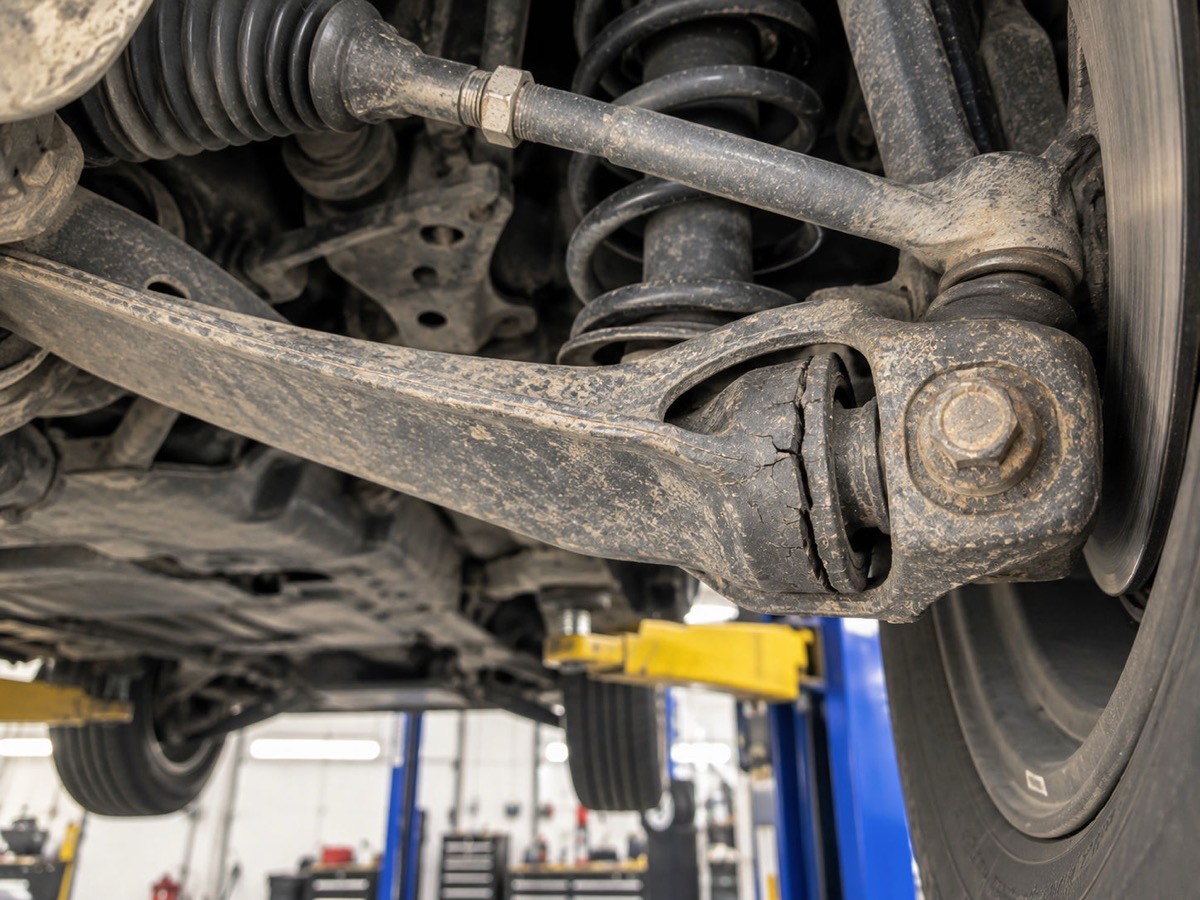
Urgent
£145

Number plate autofill
On create health check, enter the UK registration / number plate. Vehicle details auto-fill — make, model, colour and fuel — so you spend less time typing before the inspection starts. MOT history lookup powers it, and technicians also see MOT status and recent history. Customer reports get a short MOT status line.
Auto-filled — less typing
Volkswagen Golf
Customer report
For the inspection bay
After the number plate autofills the vehicle (on all plans — see above), work through a configurable checklist, record the condition, add notes and attach photo evidence — plus Pro inspection video when you need motion as well as stills.
Current item
Pro recommendations and pricing
For Amber and Red findings, add a recommended repair and timing, then build a straightforward customer price from labour and parts. On the Pro trial and Pro yearly, add multiple priced lines on the same inspection field when one job is not enough. Optionally show VAT on customer quotes — enter prices ex VAT and customers see net, VAT and total.
Replace control arm bushing and ball joint
Customer price
£250
Labour £140 · Parts £110
Photo and video evidence
When customers can see the wear or damage themselves, recommended work is easier to understand. On Pro, add inspection video alongside photos — customers watch it on the online report.
Technician finding
Photo evidence
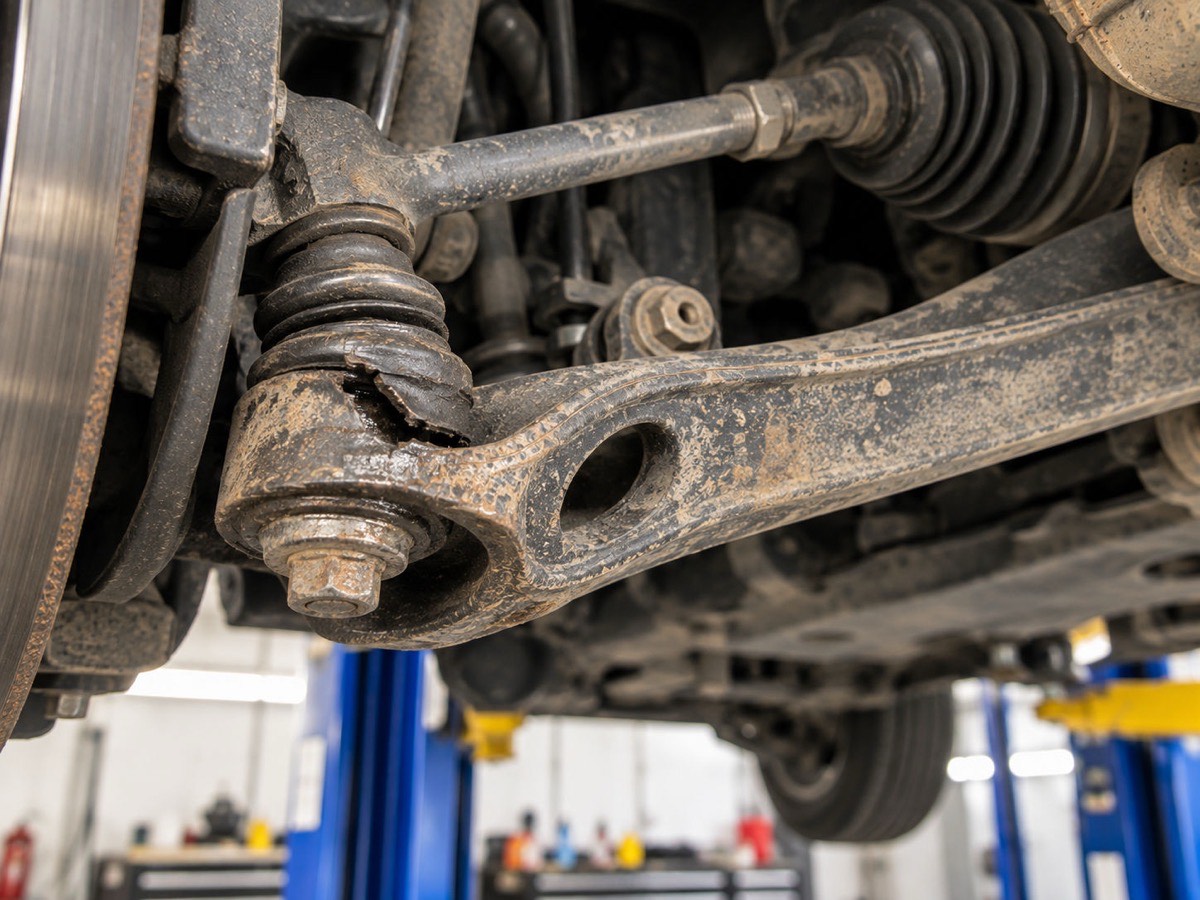
Garage-side follow-up
Customer Responses gives your garage an operational view of reports that are ready to send (Email, SMS or Both on Pro), awaiting a response or already acted on.
Vehicle HealthCheck
Garage branding
Add your garage name, contact details and logo. Your logo appears on customer-facing reports, Pro report emails and PDF reports.
Parkside Motor Works
Vehicle Health Check
DEMO 123
Team / Workers
On Pro, an Admin manages Team, garage settings, checklist, billing and commercial analytics. Workers handle operational inspection, reporting and customer responses.
Vehicle and report history
Search by registration, make/model or customer details, then open report history for repeat visits and previous work. On Pro, when a car comes back, the items left open last time can be waiting at the top of the new inspection.
DEMO 123 · From previous visits (2)
Fits your existing setup
Vehicle HealthCheck is focused on the inspection-to-customer-decision process. It complements the systems you already use for running the rest of the workshop.
Continue using it for the rest of your workshop.
Bring the vehicle health check and customer decision together.
From UK garages
“We find it brilliant, saves everyone running around. That video inspection is the biggest game changer for us”
“The app is a game changer, we used to write everything on paper. Now we create reports in the app and send them to the customers. I still like to have personal contact with our customers so once they receive the reports I give them a call.”
“Original Vehicle HealthCheck was created for me in 2019 as a custom software. It has come such a long way from when it was first created”
Straightforward plans
Basic covers the core digital health check with number plate autofill (saves typing before the inspection), photo evidence and PDF email. Pro adds customer pricing, optional VAT breakdown on quotes, secure online reports, inspection video, SMS report links, customer decisions, next-visit follow-ups, Customer Responses and commercial visibility — with multi-line recommendations, longer video and a higher SMS allowance on Pro yearly. Enterprise is for workshops that need custom features — price based on what you need. Autofill and MOT history stay on every self-serve plan — including the free trial.
Digital inspections and professional report delivery.
or £199 / year
Starts with 14 days of Pro. No card required.
Everything in Basic, plus the customer decision workflow.
Billed monthly
Best value — multi-line pricing, longer video and more SMS.
Equivalent to about £41.58 / month · billed yearly
Trial includes multi-line recommendations (same as yearly).
14-day Pro trial. No card required. No per-vehicle or per-inspection charges. Number plate autofill and MOT history lookup are included on Basic, Pro and the free trial. Team / Workers included on Pro (Admin + Workers). Basic is one Admin only — no Workers. VAT on repair quotes and next-visit follow-ups are included on Pro monthly, Pro yearly and the trial (not Basic). Pro monthly includes a 2 min end-of-inspection summary video and one priced recommendation per inspection field; Pro yearly (and the 14-day Pro trial) adds multi-line priced recommendations per field, a 4 min summary plus optional 30s clips on inspection items, and a higher SMS allowance (500/mo vs 100/mo). Enterprise is custom features with pricing based on what you need — contact us; no self-serve Stripe checkout.
Frequently asked questions
Vehicle HealthCheck is digital vehicle health check software for UK garages. Technicians carry out inspections, add photo evidence and recommended work, then send a clear customer report — so inspections turn into approved repair work.
No. Vehicle HealthCheck is garage software for digital vehicle inspections and customer repair approvals. It is not the NHS Health Check, and it is not a Halfords consumer ‘vehicle health check’ booking product.
No. Vehicle HealthCheck isn’t software for managing your entire garage. It’s software for turning inspections into clear, customer-approved repair work — so it sits alongside your existing booking, invoicing, accounting and workshop systems.
Yes. Independent UK garages use it day to day — including workshops like JM Diagnostics, L.G Mechanics and Motocraft Service LTD. Their feedback is on the homepage testimonials section, with Google Maps links to each garage.
No. Pro customer reports are opened through a secure link sent by email or SMS. Customers can review findings and make a decision without creating an account.
Yes, on Pro. Customers can approve or decline recommended work from the secure report, approve all remaining items, or request a callback.
Yes. In a Pro customer report, customers can approve or decline work item by item, approve all remaining work or request a callback.
On Pro (monthly and yearly) and the free trial, next-visit follow-ups can show it again. When you start an inspection on a registration you have inspected before, Amber (Monitor) items, declined work and Red items with no customer decision from previous visits appear as a pre-check list at the top of the new inspection, so nothing gets missed. The technician re-checks each item as normal: Green clears it, Amber or Red carries it to the next visit. An Admin turns it on in Settings (it is off by default); Workers then see the list on their inspections. Customers do not see it. It is a technician checklist, not a bookings or jobs board, and it is not on Basic.
On create health check, enter the UK number plate / registration. Vehicle details auto-fill — make, model, colour and fuel — so you type less before the inspection starts (you can still edit them). MOT history lookup powers the autofill and shows MOT status and recent history to the technician. Customer reports show a short MOT status line. If the lookup fails or the vehicle is not found, enter details manually — creating a report is never blocked.
Yes. Enter the number plate to autofill vehicle details and see MOT status/history — included on Basic, Pro and the free trial, not Pro-only. Road tax remains a manual field; we do not offer live tax lookup.
Yes. Basic, Pro and the free trial all include number plate autofill and MOT history lookup for garages that can create reports. The 14-day Pro trial includes it, and it remains available if you continue on Basic or Pro.
Yes. Technicians can attach multiple photos to inspection items (up to 3 per field), helping customers understand the finding.
Yes on the Pro trial and Pro yearly. You can add multiple priced recommendation lines on the same inspection field — up to about 5 lines total — each with a description, parts and labour. Extra lines can include an optional photo; the field still allows up to 3 photos overall. Pro monthly keeps one priced recommendation per field (upgrade to yearly for multi-line). Basic has no priced recommendations.
Yes on Pro (monthly, yearly and the free trial). An Admin can turn on “Show VAT on customer quotes” in Settings — it is off by default. Enter labour and parts excluding VAT, set your rate (default 20%), and the customer report and quote show net (ex VAT), VAT and total (inc VAT). It is for quote and approval display only, not a tax invoice or accounting product, and it is not on Basic.
Yes on Pro. Video sits alongside photos (record-only, no gallery upload). Pro monthly: one summary video at the end of the inspection, up to 2 minutes (auto-stop). Pro yearly: up to 4 minutes end summary plus optional 30-second clips on inspection items. Customers tap to play on the online report only — video is not embedded in the PDF. Basic stays photos only; upgrade to Pro for video.
Yes on Pro. Report delivery offers Email, SMS or Both (Twilio-powered UK SMS with the secure report or approval link). Pro monthly includes up to 100 SMS per calendar month; Pro yearly up to 500 SMS per month. An optional auto reminder can send once at 24 hours if the customer has not decided yet (turn it off in Settings). You can also opt in to an admin SMS when a customer responds — UK mobile numbers only. Basic remains email only.
Yes. Your garage logo can be uploaded in settings and appears on customer-facing reports, Pro report emails and PDF reports.
Basic is one Admin / single user login only — no Workers or team accounts. Pro includes Team / Workers (Admin + Workers): Admins manage Team, billing, garage settings and commercial analytics; Workers handle operational inspection, reporting and response work.
Yes. Garage admins can download a CSV of customer and vehicle contact data from the app (Settings → Garage) for use in their own marketing tools, such as Mailchimp. Workers cannot download it. You remain responsible for having a lawful basis before sending marketing messages.
Yes. The inspection workflow and customer report are designed to work on phones, tablets and desktops.
Yes. Basic reports are delivered as PDF email attachments. Pro emails include a secure customer-report link as the primary action and a PDF copy.
New garages receive a 14-day Pro trial after email verification and garage provisioning. No card is required.
No. The 14-day Pro trial does not require a card.
When the trial ends, the garage becomes read-only until a plan is chosen. Existing data, reports, evidence and history are retained. The trial includes multi-line priced recommendations (same as Pro yearly); if you continue on Pro monthly, new edits stay single-line while historical multi-line data on past inspections remains visible. Next-visit follow-ups and VAT on repair quotes stay available on Pro monthly and yearly, but not on Basic.
No. Self-serve plans are priced monthly or yearly. There are no per-vehicle or per-inspection charges. Enterprise is priced based on the features you need.
Yes. Enterprise is for workshops that need any custom features beyond the self-serve Basic and Pro plans. Pricing is created based on the features you need — contact us for a quote. There is no self-serve Stripe checkout for Enterprise.
Pro customer reports are sent with a secure link by email, SMS or both. Customers open the link on their phone or computer — no account required. Basic reports are PDF email only.
Ready when you are
Give your technicians a clearer health-check workflow and give customers a straightforward way to respond.
Contact
Prefer to talk first? Send a message and we will get back to you. For the fastest way to try Vehicle HealthCheck, start the 14-day Pro trial from the app login page.